
Manage a budget (Budget Owner)
This section refrers to "Budget Owners"
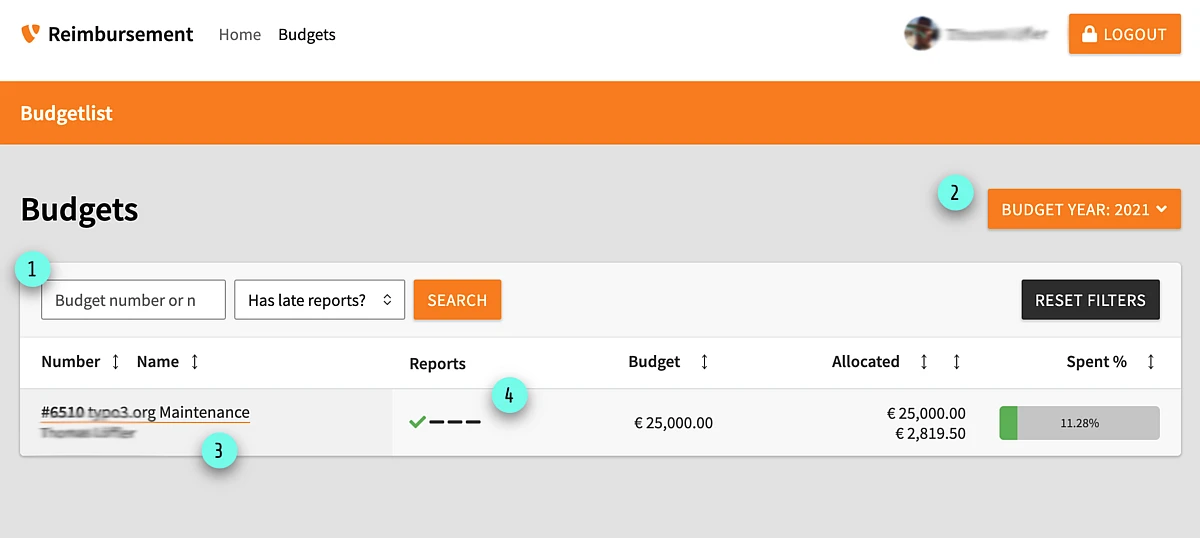
Budget list
In the list view you have several options:
- Filter area: Filter by name or budget number - you can also filter by those budget who do have late reports
- Year switcher: Switch between the different budget years
- Budget Details: Click on the title of the budget to switch to the detail view of this budget
- Reports: Shows if a report is send in (Black check), if the report is approved (green check) or if the report is missing (- sign)
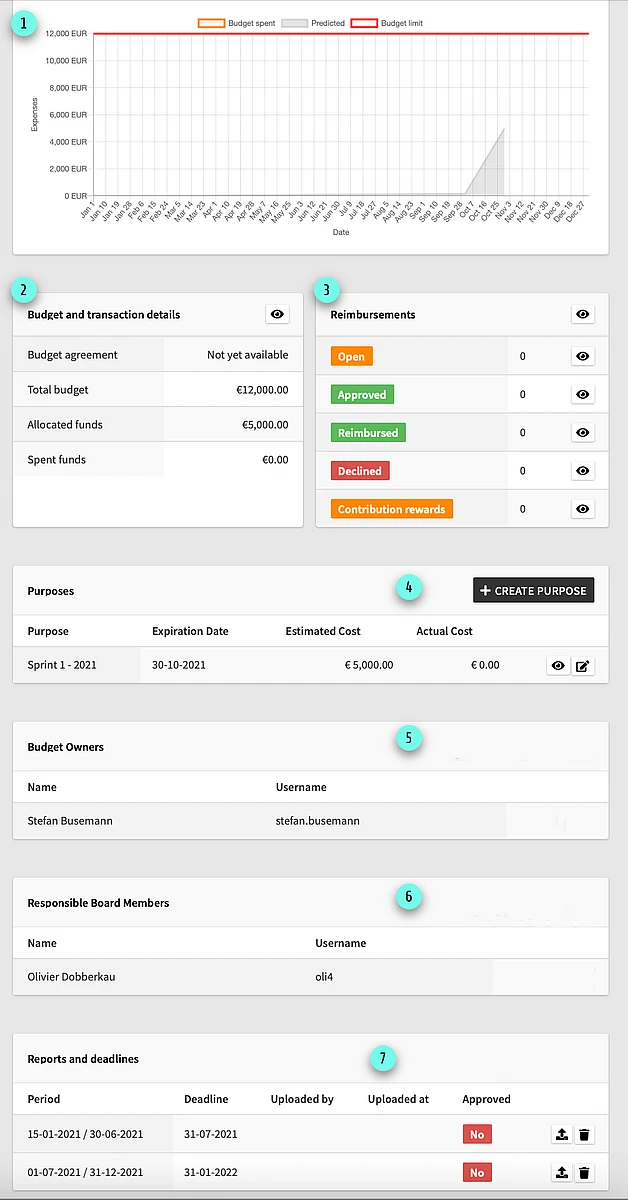
Budget Details
If you open the details of a budget, you find several options and infos:
- Analysis: The report shows you the predicted usage (grey) and the actual usage of this budget
- Budget and transaction details: An overview about numbers of this budget. You can add manual transactions for this budget.
- Reimbursements: Provides an overview for reimbursements. You can download there all receipts and see the history of each reimbursement
- Purpose: Each reimbursement needs a purpose. They are used to provide a clear structure for the budget and offer more transperency. You also limit a purpose to specific users.
- Budget Owerers: Shows, who is allowed to manage this budget
- Responsible Board Members: Shows, who is responsible to monitor this budget - contact those in case of any questions
- Reports and Deadlines: Define how many reports a budget should have. Please upload your reports for the required periods
Reporting
As a budget owner you are dealing with the money of the Members of TYPO3 Associaton. Please keep in mind, that you always spend the money within the limits of your budget agreement and aligned within the goals of TYPO3 Association. You are responsible to report the usage of the money and your activities towards the members via the required reports!
What schould your report contain?
- Which activities had your team / project in the reported period
- Url of the published article at typo3.org or any other official plattform (talk.typo3.org, docs.typo3.org, typo3.comm, ...). The article should make your efforts public to our community and members
- Do you have any blockers?
- What do you plan in the remainig reporting periods?
- Will you use your budget as planned or can the Board shift money towards other budgets?
- Will you need more budget?
Please use the document template and upload it into the reimbursement tool.
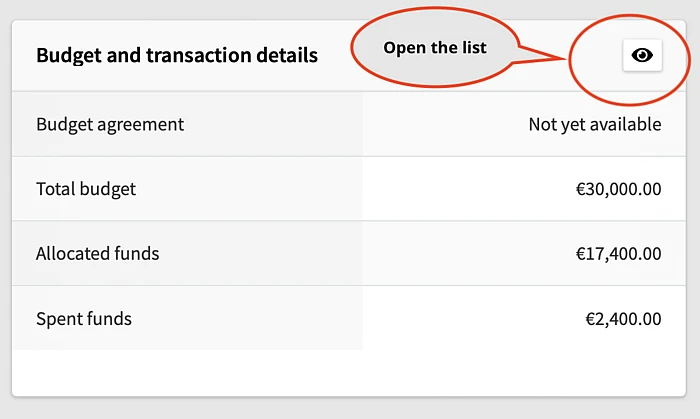
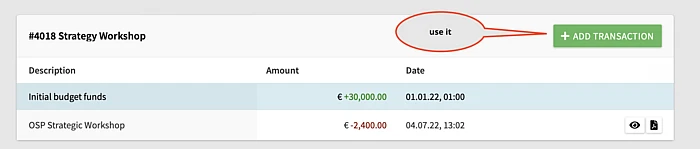
Manual transactions
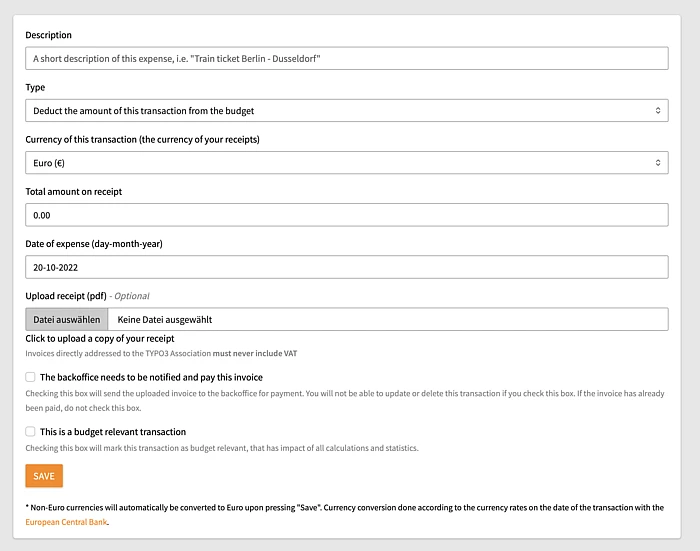
If you want to hand in an invoice, which should get paid directly to the invoice holder, then you can use a manual transaction.
Fill in all fields and attach the invoice. This transaction is send via mail to the BackOffice and they are advised to pay this invoice to the sender of the invoice.
This is useful, if you don't want to pay this invoice in advance by yourself
- Open the transaction list in the budget overview
- Add a new transaction
- Add all needed information to the transaction
Relevant info to add a transaction
- Description: A short description about this budget transaction. Please
- Type: Define if this transaction should add (income or buget increase - only available for Budget Management) or deduct (costs or budget decrease) money.
- Currency of this transaction (the currency of your receipts): Choose the currency for this transaction.
- Total amount on receipt: The amount of money in the given currency.
- Date of expense (day-month-year): When will the transaction get valid.
- Upload receipt (pdf): If you pay an invoice you need to provide a receipt (!!!)
- The backoffice needs to be notified and pay this invoice: Checking this box will send the uploaded invoice to the backoffice for payment. You will not be able to update or delete this transaction if you check this box. If the invoice has already been paid, do not check this box.
- This is a budget relevant transaction: Define if the transaction is a change for the budget itself. If you want to change the height of the budget, then please aktivate this option (only available for Budget Managers of TYPO3 Association)
Manage Purposes
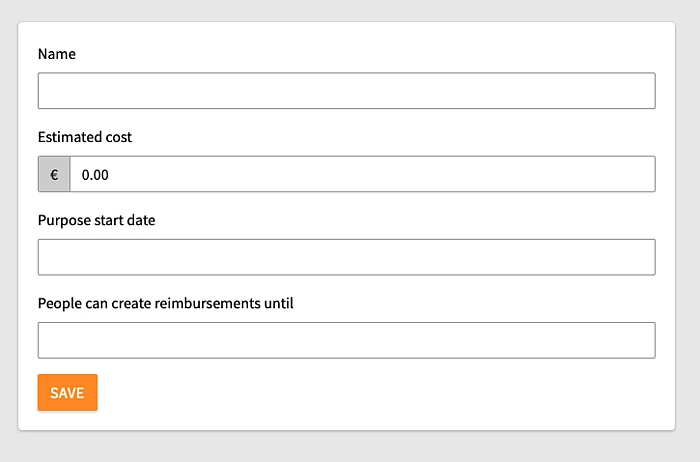
A purpose is a small "budget" inside the budget. So it is easier to plan a budget and distribute. If you create a a purpose, you get these properties:
- Name: Title of this purpose
- Estimated cost: Limit for this purpose - until this amount user a hand in reimbursements
- Purpose start date: After this date, users can hand in reimbursements
- People can create reimbursements until: After this date, no reimbursements are accepted.
Limit a purpose to specific users
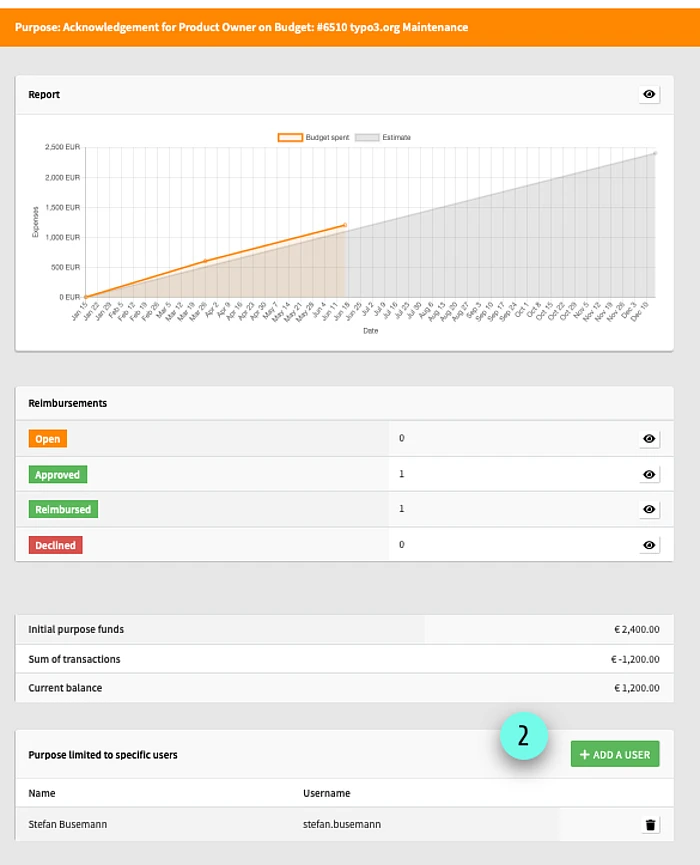
If can be useful, to allow only specific users, to reimburse versus a purpose. To achieve this, follow these steps.
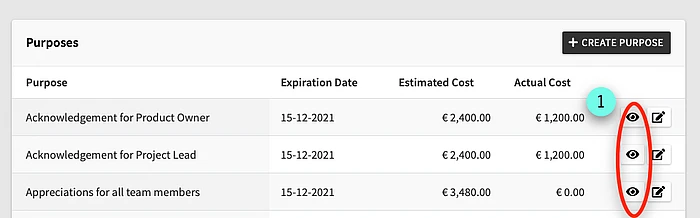
- In the Budget detail view, locate the list of purposes and click at the detail view of the purpose
- Use the "ADD A USER" Button in the area "Purpose limited to specific users" and select a my.typo3.org user account.